


Getting traffic is the easy part. Convincing a stranger to hand over their name, email, or phone number is where most landing pages fall short.
People see offers all day. If the value is not obvious within the first few seconds, they leave, and the ad budget that brought them there goes with them.
The best lead generation landing pages share one habit. Every element on the page supports a single yes. The offer is clear, the page is simple, the proof sits close to the form, and the next step is obvious.
This guide looks at five industries where that approach works well: legal services, agencies, recruiting, real estate and insurance. For each one, you will see what the page does, why it converts, and how to build the same kind of page with the CliqForms AI landing page builder, without a designer or a developer.
A note on the numbers. The conversion rates quoted below were reported by the publisher of a set of examples built in another landing page tool, mostly for paid social traffic. They are self-reported and not CliqForms results. Treat them as a sign of what a focused page can achieve, not as a promise.
What Makes a Lead Generation Landing Page Convert

A lead generation landing page is a single-purpose page that trades contact details for a clear offer, such as a free case review, a guide, a workshop place, or a quick application. It differs from a homepage because it removes the menus, side links, and competing calls to action that give visitors a reason to wander off.
Five traits show up again and again in pages that perform. One specific offer for one specific audience. A headline that matches the ad or link that brought the visitor. A short form that asks only for what you will actually use. Proof placed near the form, where hesitation happens. And a fast follow-up, because a lead that waits is a lead that cools.
5 Lead Generation Landing Page Examples That Drive Conversions
1. Legal Services: Lead With a Concrete Outcome and Take the Risk Away

The legal example is a law firm page offering a free case review to people who have received unwanted marketing texts. It opens with a concrete promise about what a successful claim could be worth, then removes risk with a plain statement that the visitor pays nothing unless the firm wins. Credentials, recovery totals, testimonial videos, and recognisable logos do the trust-building. The form collects name, email, phone, state, and a privacy consent.
It works because the offer is specific, the risk is gone before the visitor has to think about it, and the proof arrives exactly where doubt appears. The long form is the weak point, so the suggested test is a two-step flow that starts with just a few eligibility questions.
In CliqForms, you describe the primary goal, for example, a free case review for a defined type of claim, and the AI builds the page structure and messaging around it. Embed a multi-step CliqForm so the first step asks a few eligibility questions using conditional logic and the second step collects contact details, which is the two-step pattern in practice. Add a consent checkbox, and use the TrustedForm certificate integration if your team needs a record of consent. Send each submission to your CRM through Zapier or a webhook so the follow-up call happens quickly. Advertising rules for legal services vary by region, so check your wording with your compliance adviser before you publish.
2. Agency: Give Away a Case Study and Ask for Very Little

The agency example offers agency owners free access to a video breakdown of a client acquisition funnel. The form asks for only a name and an email address. Results-driven testimonials, star ratings, and well-known logos carry the persuasion, and the opt-in appears again after the proof section so people can convert the moment they feel convinced.
The lesson for service businesses is that a case study makes a strong lead magnet. It shows the process, proves the result, and attracts exactly the kind of client who wants that outcome. The suggested test is three short outcome points under the headline that tell visitors what they will be able to do after watching.
To build this in CliqForms, describe your offer and your audience, and let the AI generate the page. Embed a two-field CliqForm and repeat it lower down the page after your proof section. If you would rather send people straight to a booking or a message, the builder also supports a formless page with a focused call-to-action button. Connect submissions to your email tool so the resource reaches each person the moment they sign up.
3. Recruiting: Sell Speed and Remove Friction

The recruiting example is a job application page for a remote sales manager role. Its main selling point is speed, with the button itself stating that the application takes under a minute. The headline is clear, the layout is easy to scan, one action repeats down the page, and short reassurances such as 'confidential' and 'no spam' handle the main objections without clutter.
Recruiting works because applying is a low-effort, high-intent action. The fewer steps between interest and submission, the more applications you receive. The suggested test is adding one high-intent detail above the first button, such as pay range or time zone, to improve applicant quality.
In CliqForms, create one landing page per role so the headline, details, and form match the job exactly. Keep the application short, use conditional logic to ask a follow-up question only when an answer calls for it, and turn on partial submissions so you can still see candidates who started but did not finish. Each application can reach your applicant tracking tool or inbox through Zapier or a webhook.
4. Real Estate: One Outcome, One Form, Above the Fold

The real estate example promotes a free workshop for aspiring property investors. The headline leads with a single concrete outcome and a time frame; the form sits above the fold, and a short checklist beside it explains what attendees will learn in plain language. Result cards further down add proof, and the call to action repeats. The form collects first name, last name, email, phone, and a consent checkbox.
The suggested tests are practical ones. Drop the last name or make the phone number optional, or split the opt-in into two steps so cold traffic feels a smaller commitment up front.
In CliqForms, the same page takes minutes. Describe the workshop, the open home, or the listing offer; let the AI build the page; and embed a short registration form with a consent checkbox. The QR code that CliqForms generates for every form can sit on open home signs, flyers, and brochures so offline visitors reach your sign-up form straight from the sign. Registrations can flow to your email tool to trigger reminders and follow-up.
5. Insurance: Qualify First, Then Ask for the Details

The insurance example is an application page for recruiting Medicare sales agents. It promises a two-minute application and spells out the upside clearly. It then opens with one low-effort question: whether the visitor is licensed or an unlicensed applicant with sales experience, so the funnel can personalize the path without dropping people into a long form. Benefit blocks, event imagery and a simple six-step explanation of what happens next add trust.
The same pattern suits brokers and agencies collecting quote requests. A short first question sets context, filters for intent, and makes the next step feel easy. The suggested test is a compact proof strip directly under that first question.
In CliqForms, make that first question a conditional logic branch. Visitors who pick one answer see one set of follow-up questions, and visitors who pick another see a different set, all inside a single form. Use conditional endings to show each group a different thank-you message and next step, and connect the TrustedForm integration if your team needs a consent record. Because the AI builds the surrounding page from your description, you can create a separate page for each audience, such as a quote request page and a recruitment page, in the time it would take to brief a designer.
How to Optimize Lead Generation Landing Pages
To optimize lead generation landing pages, reduce friction and add reassurance at the points where visitors hesitate. Start with a message match. The promise in your ad, email, or social post should be repeated in the headline so visitors know they are in the right place. Then protect the single goal of the page by removing navigation and extra links so that every section leads back to the same form.
Next, shorten the form. Ask only for the details you will use to follow up, and if you need qualification questions, split the form into steps so the first one feels easy. Place proof next to the form and the call to action rather than at the bottom of the page, and make sure the page loads fast and works with a thumb on a phone.
Finally, treat the page as a test bed. Change one thing at a time, such as the headline, the button wording, or the number of fields, so you know what moved the result. And do not stop at the opt-in. Deliver what you promised quickly and follow up while interest is high, which is where connecting your form to your email or CRM tool matters.
Why the CliqForms AI Landing Page Builder Is the Right Fit
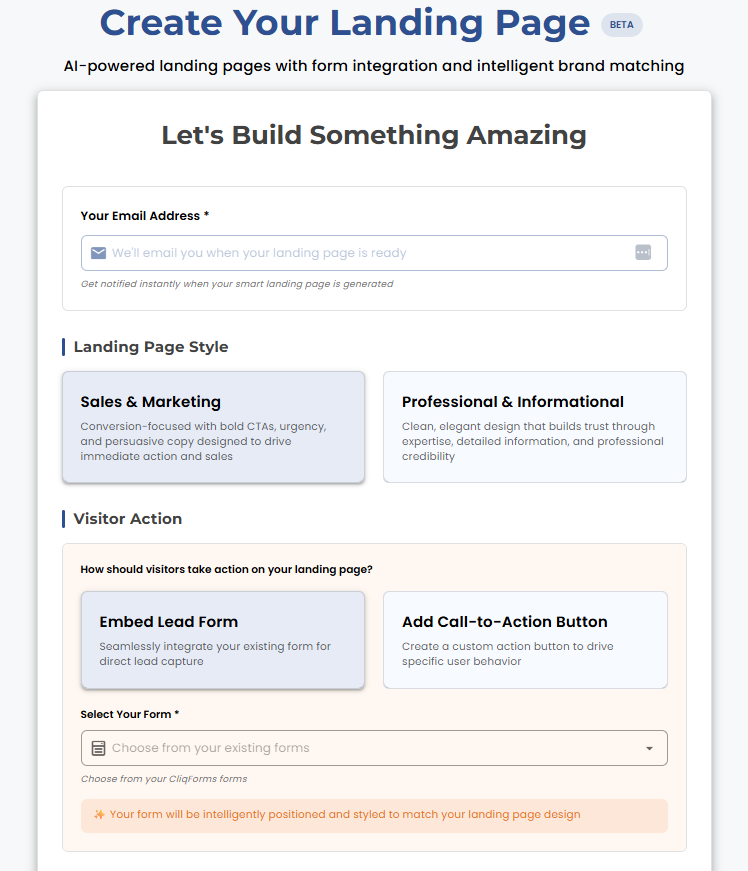
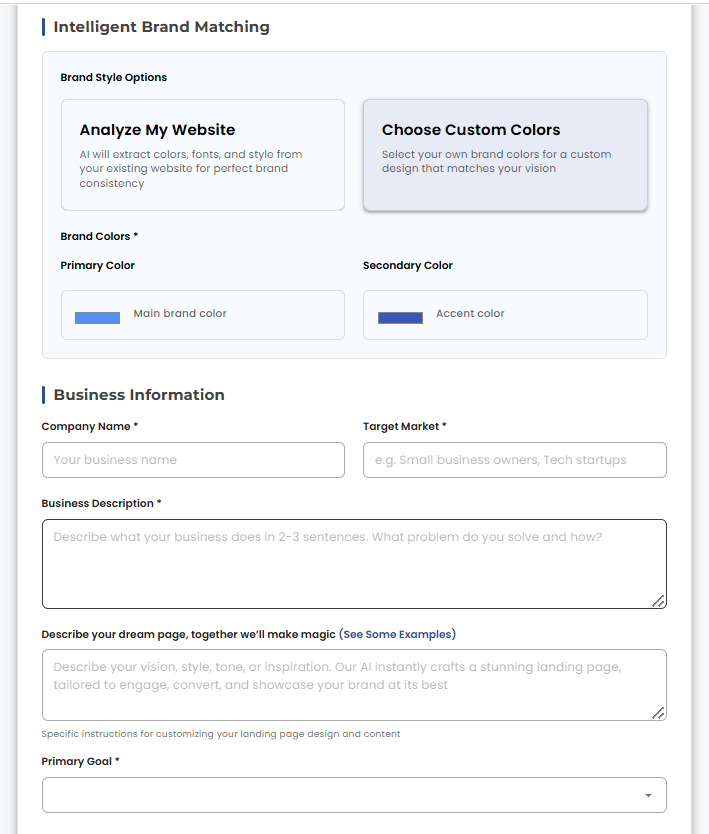
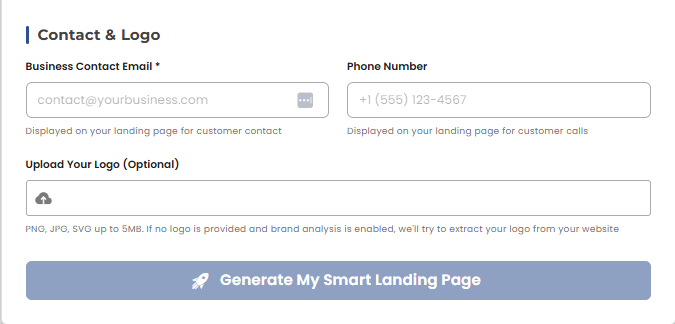
Every example above follows the same recipe, and the CliqForms AI landing page builder is designed around it. You choose to create a landing page from your dashboard, enter your business details, and offer a campaign, and the AI generates a professionally structured page with persuasive messaging and a layout built to convert. You then review, edit, and publish, usually in minutes.
From there, you decide how the page converts. Embed a CliqForm to capture leads, registrations, or responses, or go formless with a bold call-to-action button that drives clicks, bookings, or sales. Your pages live in one management dashboard where you can search, organise, edit, and track them, and updating a headline or a button does not need technical skills.
Landing pages are included in every CliqForms plan, with the number of pages depending on the plan. Bronze includes 1, Silver 5, and Gold 25. Because the builder sits inside CliqForms, the form on your page can use conditional logic, multi-step layouts, and partial submissions; send leads to your tools through Zapier and webhooks; and sit alongside QR codes and CliqSign for sending agreements for signature.
To be clear about the limits, CliqForms is not a full marketing automation or CRM suite. Email sequences and pipeline management stay in the tools you already use, connected through Zapier or webhooks. What you get is the fastest route from an idea to a live page that captures leads cleanly and passes them on.
Frequently Asked Questions
How much should I pay for a landing page?
It depends on who builds it. Published 2026 pricing guides put DIY landing page builders at roughly 20 to 100 USD a month, freelancers at around 300 to 1,500 USD per page, and agencies at roughly 1,500 to 5,000 USD or more. For most small businesses, a builder with a good AI starting point is the sensible place to begin, and you can hire a specialist later for a high-stakes campaign. In CliqForms, landing pages are included in every plan. Bronze, at 24 USD a month billed yearly, includes one landing page, and Silver, at 49 USD a month billed yearly, includes five.
Can ChatGPT build a landing page?
ChatGPT can draft landing page copy and generate the code for a simple page, which is a useful starting point. On its own, it generally does not publish the page, connect a form that stores and delivers leads, track submissions, or let you update the page later without touching code. A dedicated AI landing page builder such as CliqForms handles those parts. It builds the structure from your business details, lets you embed a form, and gives you a dashboard to manage the page.
Is there a free AI tool that can create landing pages?
Several tools offer free tiers or trials, usually with limits on pages, leads, or features. CliqForms offers a free trial, and the AI landing page builder is included in every plan, so you can try the builder before you decide whether to pay. A free trial is not the same as a permanent free plan, so check the limits of any tool before you rely on it for a live campaign.
What is the best lead generation website?
There is no single best option, because the right choice depends on what you sell and how you follow up. Look for a platform that lets you launch a focused page quickly, capture leads with a short, mobile-friendly form, and pass every lead to your CRM or email tool automatically. CliqForms suits small and medium businesses that want the landing page, the form, QR codes, and eSignatures in one place without a developer. Larger teams that need built-in email sequences and a full CRM may want a dedicated funnel suite alongside it.
How do I optimize lead generation landing pages?
Match the headline to the ad or link that brought the visitor, keep one goal per page, ask for the fewest form fields you can follow up on, put proof beside the form, make the page fast on mobile, and test one change at a time. Then follow up quickly, because the speed of your response affects how many leads you win.
Key Takeaways
- A lead generation landing page works when everything on it supports one offer, one action, and one audience.
- Across legal, agency, recruiting, real estate, and insurance examples, the same traits appear: a specific offer, a short form, proof next to the form, and a clear next step.
- Two-step forms and an easy first question lower the perceived effort, which helps in regulated or high-consideration industries.
- The CliqForms AI landing page builder turns your goal and business details into a structured page in minutes, and you can embed a CliqForm or go formless with a call-to-action button.
- Landing pages are included in every CliqForms plan, and leads can flow to your CRM or email tool through Zapier and webhooks.
Build Your Lead Generation Landing Page Today
You do not need a designer, a developer, or a week of back and forth to launch a page that converts. You need a clear offer, a short form, and a page that gets out of the visitor's way.
Describe your goal to the CliqForms AI landing page builder, review the page it creates, embed your form, and publish.
.png)




.png)