



You need a client to sign a contract. Not a thousand contracts a month, not a legal team to manage them, just one agreement signed cleanly so you can get on with the job.
DocuSign is usually the first name that comes to mind, and it is a capable product. It is also priced and built for a different kind of business than most small operators. Standard plans run from around 25 to 30 USD per user per month on an annual commitment, and that is before you add a second or third person who occasionally needs to send something. For a sole trader, a small agency, or a two-person consultancy, that cost sits oddly against how often you actually send a document.
The good news is that you do not need DocuSign to send a professional, legally binding contract. This guide covers what to look for in an eSignature solution for a small business, the free and low-cost ways to sign a document without DocuSign, and how CliqSign inside CliqForms lets you build a quote, a contract, or a whole intake form with a signature built directly in.
Why DocuSign Can Feel Like the Wrong Fit for a Small Business

DocuSign was built to serve everyone from a sole trader to a global enterprise, and that breadth shows up in the pricing. Public pricing for 2026 puts the Personal plan at around 10 to 15 USD a month for a single user sending up to five envelopes, Standard at roughly 25 to 30 USD per user per month on an annual plan with about 100 envelopes per user per year, and Business Pro at around 40 to 45 USD per user per month for features like bulk sending and payment collection.
DocuSign pricing is per user, so the bill scales with your team even when each person only sends a handful of documents a month. Three people on Standard, billed annually, works out to roughly 75 to 90 USD a month before anyone has used a single extra feature. Source: Signaturely and CostBench DocuSign pricing guides, 2026.
None of this means DocuSign is bad value for the businesses it is built for, ones sending high volumes of envelopes with a dedicated admin managing templates and permissions. It does mean that a small business sending a handful of contracts, quotes, or intake forms a month is often paying for capacity and complexity it will never use.
The other friction point is that DocuSign only handles the signature. The quote, the intake form, and the landing page that brought the client to you in the first place—all of that lives in separate tools with separate logins and separate bills.
What to Look For in an eSignature Solution for Small Business

Pricing that fits how often you actually sign
Work out roughly how many documents you send in a typical month, then look at the total cost for your team size rather than the headline per-user figure. A plan priced per document or per team, rather than strictly per seat, is often more predictable for a small business where only one or two people send contracts regularly.
A signing experience your client does not have to think about
Your signer should never need to create an account, download an app, or figure out a new interface. Look for a tool where the recipient opens a link, reviews the document, signs with a finger or a mouse, and is done.
Every electronic signature tool worth using records who signed, when, and from where andwhere, and produces a certificate you can point to if a dispute ever comes up. This is not optional for a business contract.
Somewhere to build the document, not just sign it
If you are starting from scratch for every quote or agreement, you are paying in time even if the software is free. A tool with reusable templates, or a document builder, removes that repeated work.
A path to connect signing with the rest of your workflow
A signed contract is rarely the end of the process. It usually needs to become a new client record, trigger an invoice, or kick off onboarding. A tool that connects to the rest of your stack through webhooks or Zapier saves you from manually re-entering the same details.
How to Sign a Document Without DocuSign

If someone has sent you a document to sign and you do not have a DocuSign account, you have a few straightforward options, and none of them require you to sign up for the tool the sender used.
Use your browser's built-in tools
Chrome, Firefox, and Edge all include basic PDF annotation tools that let you draw a simple signature directly on a document. This works for low-stakes, personal signing but does not produce an audit trail, so it is not suited to a formal business contract.
Use Preview on a Mac
macOS Preview lets you create a signature using your trackpad or your camera, then drop it onto a PDF. Useful for quick personal signing, again without a verifiable audit trail.
Ask the sender to switch tools
If a client or supplier needs your signature on a contract and the process feels clunky, it is reasonable to ask whether they can send it through a tool that does not require you to create an account. Most modern eSignature platforms, CliqSign included, let a recipient sign without ever registering.
Use a free plan or a free trial of an alternative
For sending your own documents rather than just signing someone else's, a free eSignature tool is usually the simplest answer. CliqForms offers a free trial so you can test sending a contract for signature before committing to a paid plan.
How to Send a Contract for Signature With CliqSign
CliqSign is the eSignature platform built into CliqForms, and it is designed for exactly this situation: a small business that wants to send a professional contract without learning a complex enterprise tool.
Start by choosing how you want to create your document. You can upload an existing PDF you already use, pull a ready-to-use agreement from the CliqSign contract template library, or use the document builder to write a document from scratch inside CliqSign.
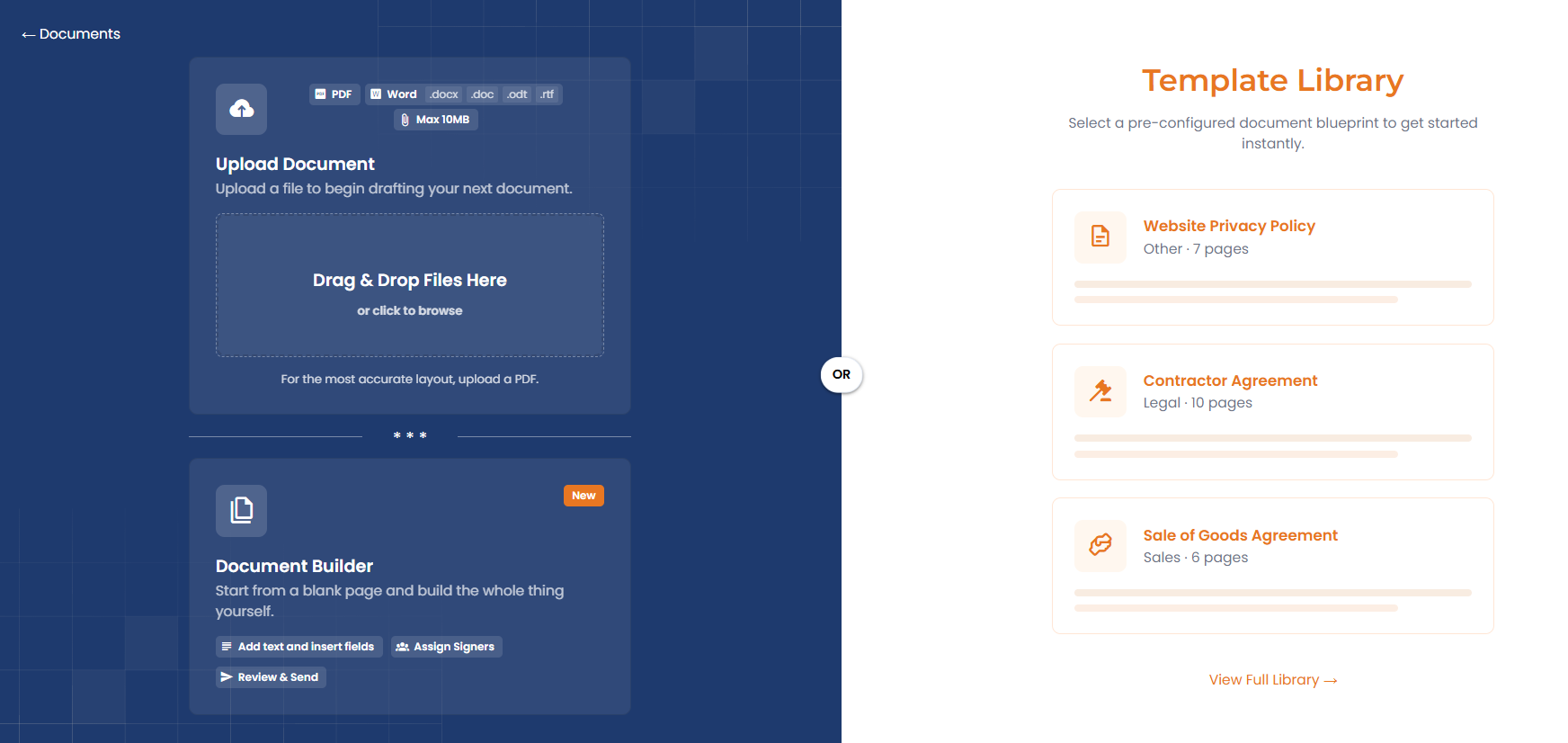
Once your document is ready, drag signature fields onto the page wherever you need a signature, initials, or a date. You can duplicate fields if more than one person needs to sign and assign each signer by name and email. Send the document by email or as a shareable link, and your recipient opens it in their browser with no account and no software to install. They type, draw, or upload their signature, accept, and the signed copy is emailed to both parties automatically.
CliqForms also offers a second way to collect a signature that DocuSign does not: a dedicated signature question type you can drop directly into any form you build. This means a client can fill in a booking form, an intake form, or a quote request and sign off on your terms in the same step, rather than completing a form and then waiting for a separate signing email. For businesses whose documents genuinely start as a form submission, a quote request, or a service booking, this single flow removes an entire handoff.
Every signed document includes an audit trail recording who signed, when, and from where, which is stored in your CliqForms dashboard for you to retrieve later.
What CliqSign Costs Compared to DocuSign

CliqForms Bronze is 24 USD a month billed annually, or 29 USD billed monthly, and includes a signature question and a payment question inside your forms, along with 20 forms, 500 leads a month, and one landing page. The full CliqSign app, with document upload, the template library, the document builder, and team signing, starts on Silver at 49 USD a month billed annually, or 59 USD billed monthly. Silver includes up to 50 documents a month across a team of three, a 25MB maximum file size, an audit trail, reusable templates, signing reminders, and webhooks, alongside 200 forms, 5,000 leads a month, and five landing pages.
The comparison is simplest at the point most small businesses actually sit. Three people on DocuSign Standard, billed annually, run to roughly 75 to 90 USD a month for signing alone. CliqForms Silver is 49 USD a month for the same team size, and that single plan also covers your forms, your lead capture, and your landing pages, not just the signature. If your documents already start life as a quote, a booking, or an intake form, that is the more direct comparison: one monthly cost for the whole process rather than a signing tool plus everything else.
Where DocuSign still has a real edge is at high volume. If you are sending hundreds of envelopes a month, DocuSign Standard and Business Pro have no document cap, while CliqForms plans are tiered by a monthly document allowance. A business signing that many contracts has outgrown the problem this guide is written for.
Frequently Asked Questions
How do I sign without DocuSign?
If you only need to sign a document someone else sent you, your browser's built-in PDF tools or macOS Preview can add a basic signature for low-stakes use. For sending and managing your own contracts, an alternative platform such as CliqSign lets you upload a document, place signature fields, and send it for signature, with the recipient signing in their browser without creating an account.
What else can I use instead of DocuSign?
Several eSignature tools serve small businesses well as DocuSign alternatives, including Xodo Sign, PandaDoc, and CliqSign inside CliqForms. CliqSign is a practical choice if your signing needs are tied to forms, quotes, or bookings, since it combines document signing with a form builder, a document builder, and a contract template library in one platform, rather than requiring a separate tool just for signatures.
How do I send a contract to be signed for free?
Start a free trial with an eSignature platform such as CliqForms to test sending a contract before paying. Upload your contract as a PDF, or use a ready-made template from the contract template library, add a signature field, enter your recipient's email address, and send. The recipient can review and sign without creating an account, and you can confirm the flow works for your business before committing to a paid plan.
Can I sign a document without a DocuSign account?
Yes. If someone sends you a document through DocuSign, you typically do not need an account to open and sign it; you follow the link in the email they sent. The same is true of most modern eSignature platforms, including CliqSign, where a recipient can review and sign a document directly in their browser without registering for the platform the sender used.
Is CliqSign a good DocuSign alternative for small business contracts?
CliqSign is well suited to small businesses that send a moderate volume of contracts, quotes, or agreements each month and want signing built into the same platform as their forms and lead capture. It includes a document builder, an upload option, a contract template library, and a dedicated signature question type for forms. Businesses sending very high volumes of documents or needing bulk sending and advanced enterprise features may still be better served by DocuSign's higher-tier plans.
Key Takeaways
- DocuSign pricing runs from around 25 to 45 USD per user per month on Standard and Business Pro, which adds up quickly for a small team that only occasionally sends a contract.
- You do not need a DocuSign account to sign a document someone else sent you, and you do not need DocuSign at all to send your own contracts for signature.
- A good eSignature solution for small business should price around how often you actually sign, let recipients sign without creating an account, and keep a proper audit trail.
- CliqSign inside CliqForms lets you upload a document, use a ready made contract template, or build a document from scratch, then send it for signature with no account required from the signer.
- CliqForms also offers a dedicated signature question type, so a client can fill in a form and sign off on your terms in a single step, something a standalone signing tool does not offer.
- Three people signing on CliqForms Silver costs 49 USD a month, against roughly 75 to 90 USD a month for the same team on DocuSign Standard, and the CliqForms plan also includes your forms and landing pages.
Send Your Next Contract Without the Enterprise Price Tag
You do not need a thousand envelope allowance or a dedicated admin to send a contract that gets signed properly. You need a document, a signature field, and a way for your client to say yes without friction.
CliqSign inside CliqForms gives you that, upload a document or build one from scratch, add a signature, and send. Free to start, no account required from your signer.




.png)