
update - collect payments in your forms with the new payment type field

Published On:
May 4, 2026
Here in this guide, you will see how to change the border radius of different UI elements in the form.
The border-radius is a setting to change the shape of form elements.
For example, you can change the border radius of input boxes, select buttons, image/icon buttons, navigation buttons, and the whole form background.
You can find the border-radius options provided in the Design section under UI Elements.
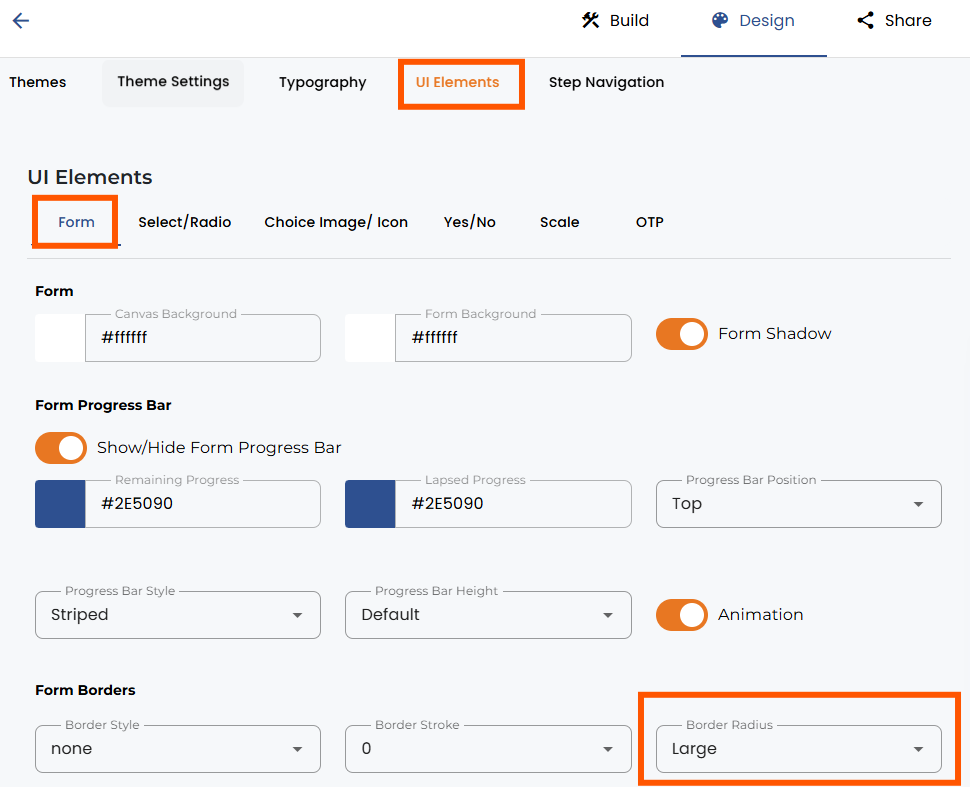
Simply open the tab of the form content you want to edit and then change the border radius. The image above shows an example of editing the border radius for the form background.
Opening the other tabs of questions, select the input box and the choice image/icon to provide more customization options for other elements of the form.
You can also change border color, border width, and border style in here.


.png)
