


How to Collect NPS Feedback Automatically After Every Job or Sale

The bad review lands. You read it. And your first thought is, "Why didn't they just tell me?"
Most small business owners find out a customer was unhappy the worst possible way through a public review, a social media post, or worse, silence followed by never seeing them again. By the time you know there was a problem, the damage is already done.
There is a better way. An NPS survey—sent automatically after every completed job or sale—gives your customers an easy, private channel to tell you how they really feel. And it gives you the early warning system you need to fix problems before they become reviews.
This guide explains what NPS is, why it works for small and medium businesses, NPS survey best practices, and how to set one up automatically using CliqForms—in about ten minutes.
What Is an NPS Survey?
NPS stands for Net Promoter Score. It is a customer feedback method built around one question:
How likely are you to recommend us to a friend or colleague? (0-10)
Customers who respond with 9 or 10 are Promoters—loyal, happy customers likely to refer others. Those who score 7 or 8 are passives—satisfied but not enthusiastic. Those who score 0 to 6 are detractors—unhappy customers who may publicly share their experiences.
Your NPS is calculated by subtracting the percentage of detractors from the percentage of promoters. Scores range from -100 to +100. A score above 0 is good. Above 50 is excellent.
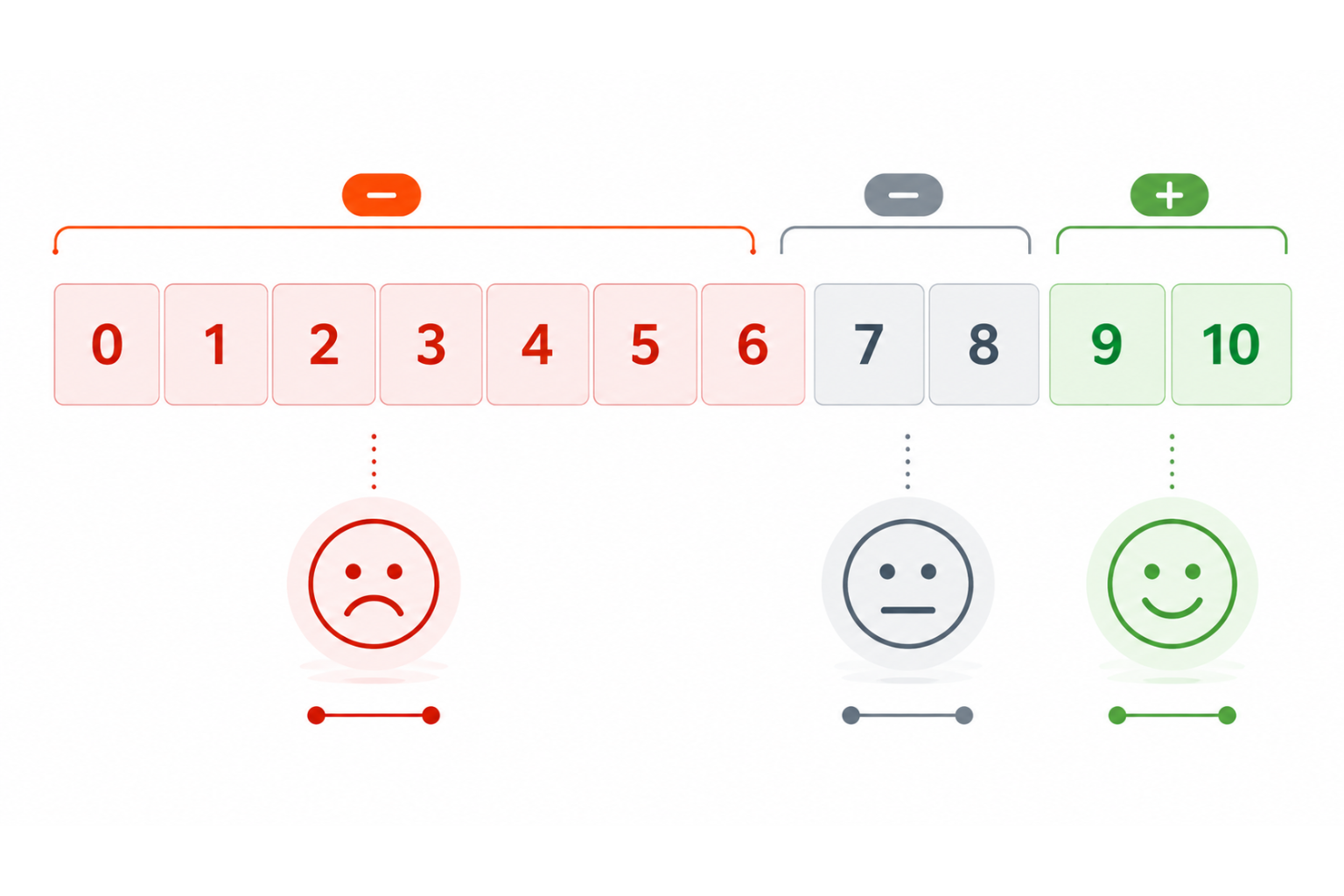
What makes NPS particularly powerful for SMEs is its simplicity. One question, answered in seconds, gives you a real-time read on customer sentiment—before it turns into a public problem.
Why Waiting for Reviews Is Costing You
Most businesses rely on one of two signals to know if a customer is happy: they come back, or they leave a review. Both are lagging indicators; by the time you have the signal, the moment to act has passed.
Around 96% of unhappy customers do not complain directly to the business. They simply leave—and 13% of them tell 15 or more people about their bad experience. -- Customer Experience research, 2025
An NPS survey flips this dynamic. Instead of waiting for customers to volunteer feedback publicly, you proactively ask every customer, privately, immediately after the experience is fresh. This means:
- Detractors get a private channel to tell you what went wrong—before they go public with it.
- Promoters are identified while the positive experience is fresh—the perfect moment to ask for a referral or review.
- You build a real picture of customer sentiment over time, not just a collection of outliers.
NPS Survey Best Practices: What Makes One Work
Before setting up your NPS survey, it helps to understand what separates an effective one from one that gets ignored. Here are the NPS survey best practices that consistently produce higher response rates and more useful data:
Send it at the right moment
Timing is everything. The best time to send an NPS survey is within 24 hours of a completed job, delivery, or sale when the experience is still vivid. Surveys sent days or weeks later see significantly lower response rates and less accurate feedback.
Keep it short
The NPS question itself is one line. Add one optional follow-up question, 'What is the main reason for your score?'—and nothing else. Every additional question reduces your completion rate. The value of NPS lies precisely in its brevity.
Make it mobile-friendly
Most customers will open your survey on a phone. If the form is hard to use on mobile—small tap targets, poor layout, slow loading—they will close it without responding. Your NPS survey software needs to be mobile-first by default, not as an afterthought.
Follow up with Detractors immediately
When a customer scores you 0 to 6, do not wait. Set up an automatic internal alert so you or your team can reach out personally, acknowledge the issue, and offer to make it right. A detractor who feels heard can become a loyal customer. One who is ignored becomes a bad review.
Track your score over time, not just once
A single NPS reading tells you little. The value comes from tracking it consistently—after every job, every month, every quarter—so you can see whether your customer experience is improving or declining in response to changes you are making.
How to Set Up Automatic NPS Surveys in CliqForms
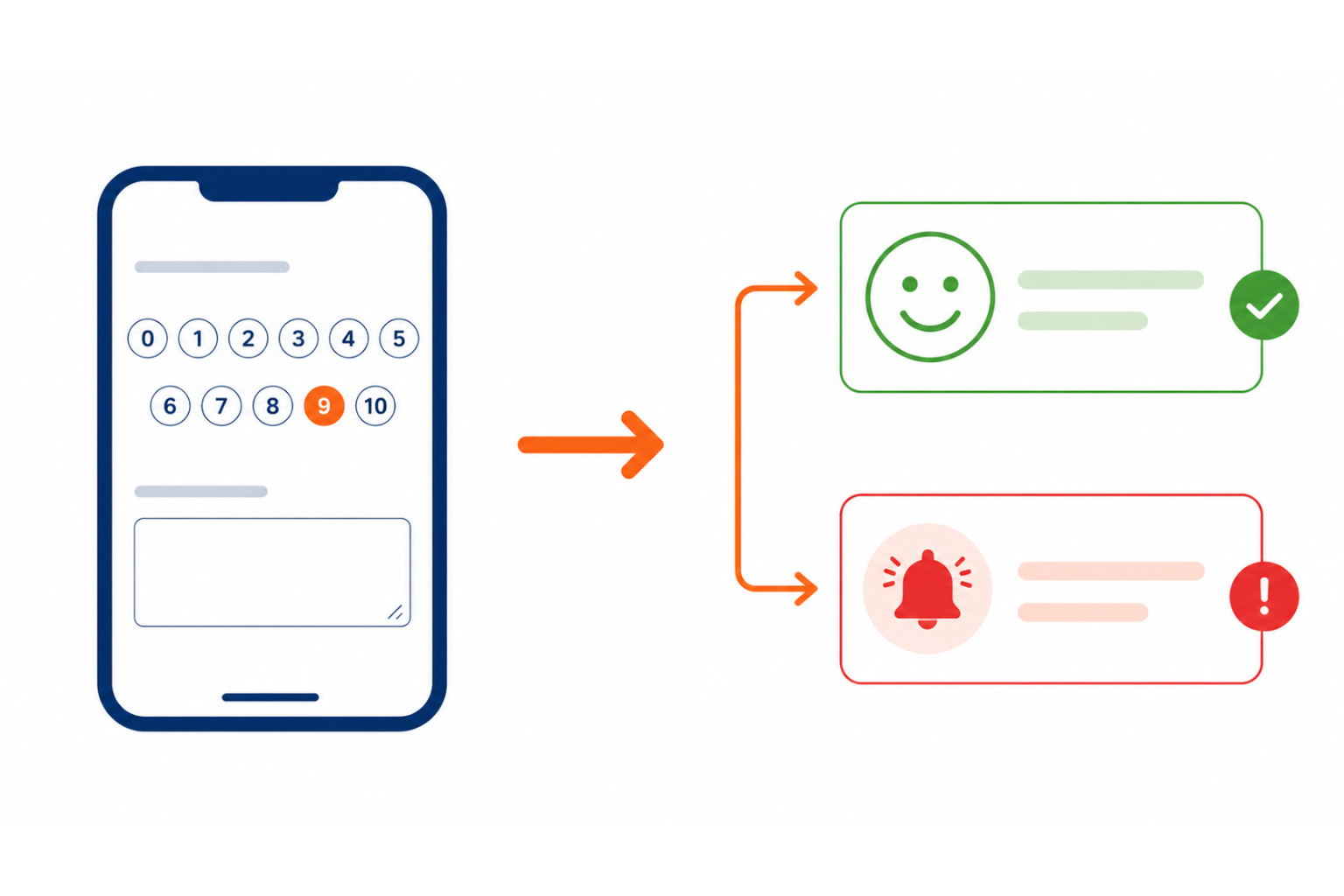
CliqForms lets you build, send, and track NPS surveys without any technical setup. Here is how to get your automatic post-job NPS survey running in minutes.
1. Build your NPS survey in CliqForms. Log in to CliqForms and create a new form. Add a rating scale question set to 0-10 with the standard NPS question: 'How likely are you to recommend us to a friend or colleague?' Below it, add one optional open text question: 'What is the main reason for your score?' That is your entire survey—resist adding more.
2. Set up conditional logic for the follow-up. Use CliqForms' conditional logic to show a different follow-up message based on the score. Promoters (9-10) can be shown a message inviting them to leave a Google review or refer a friend. Detractors (0-6) can be shown a message asking them to get in touch directly. This personalizes the experience without creating multiple forms.
3. Configure your notification settings. Set up an instant email or webhook notification to fire every time a form is submitted. For low scores specifically, make sure you or your team receives an immediate alert so follow-up can happen quickly. CliqForms connects to Zapier and webhooks, so notifications can go to Slack, your CRM, or your email.
4. Connect CliqForms to your workflow via Zapier or webhook. To send the NPS survey automatically after every job or sale, connect CliqForms to the tool you use to mark jobs as complete, whether that is a CRM, invoicing software, or a simple spreadsheet. When a job is marked complete, Zapier triggers the CliqForms survey link to be sent to that customer automatically. No manual work required.
5. Use a shareable link or email embed. CliqForms gives you a shareable link for your NPS survey that can be included in your post-job email, invoice, or SMS. If you are not ready to automate via Zapier yet, simply add the CliqForms survey link to your standard completion email—one link, consistent delivery after every job.
6. Track responses in CliqForms. Every submission is logged in your CliqForms dashboard. Review responses regularly to spot patterns, recurring complaints, consistent praise, and specific team members or services generating detractors—and use that data to make informed improvements.
The best NPS survey software is the one your customers actually complete. CliqForms keeps forms short, mobile-first, and fast to load—the three factors that have the biggest impact on NPS response rates.
Frequently Asked Questions About NPS Surveys
What is a good NPS score for a small business?
Any score above 0 means you have more Promoters than Detractors, which is a positive baseline. A score of 25 or above is generally considered good for most SME categories. Scores above 50 are excellent and indicate strong customer loyalty. The most important benchmark is your own score over time; consistent improvement matters more than hitting a specific number.
How often should I send an NPS survey?
For transactional NPS sent after every job or sale, send it within 24 hours of completion. For relational NPS, measuring overall business sentiment once per quarter is the standard recommendation. Do not survey the same customer more than once every 90 days to avoid survey fatigue.
What is the difference between NPS survey software and a basic survey tool?
Basic survey tools let you create a form with a rating scale. NPS survey software goes further—it calculates your score automatically, segments responses into Promoters, Passives, and Detractors, alerts you to low scores, and tracks your NPS over time. CliqForms brings smart form logic, instant notifications, and integration with your existing tools, making it a practical NPS survey software option for SMEs that need results without complexity.
What should I do when a customer gives a low NPS score?
Respond quickly and personally. A customer who gives a low score and then receives a genuine, prompt follow-up from the business is far more likely to give you a second chance—and far less likely to leave a public review. Use CliqForms' notification settings to get an immediate alert for any score of 6 or below, and treat that as a priority follow-up.
Can I use CliqForms for NPS surveys without technical knowledge?
Yes. CliqForms is built for non-technical users. You can build and publish an NPS survey in under ten minutes with no code required. For automated sending after every job, the Zapier integration requires a one-time setup but no ongoing technical management. If you want to start simply, add your CliqForms survey link to your standard post-job email immediately—automation can come later.
Key Takeaways
- Most customers who are unhappy never complain directly; they leave quietly and sometimes publicly. NPS gives them a private channel before that happens.
- NPS surveys work because they are short, timely, and easy to respond to. One question is all you need.
- Send your NPS survey within 24 hours of job completion when the experience is freshest and response rates are highest.
- Use conditional logic to show Promoters a review request and Detractors a direct contact option—personalized without extra effort.
- Set up immediate alerts for low scores so you can follow up before a detractor becomes a bad review.
- CliqForms lets you build, send, and track NPS surveys—with Zapier integration for fully automatic post-job sending.
- Track your NPS over time. Consistent improvement matters more than any single score.
Stop Finding Out Too Late
The bad review is not the problem. It is the symptom of a problem that went unaddressed—because no one asked the customer how they felt while there was still time to do something about it.
An NPS survey, sent automatically after every job or sale, closes that gap. It gives every customer a voice, gives you the data to improve, and gives your business the early warning system it needs to protect its reputation and grow through word of mouth.
CliqForms makes it simple to build, connect, and automate—so you can focus on the follow-up, not the setup.




.png)